
1. Tasks: recurring task start date from client custom fields
Section titled “1. Tasks: recurring task start date from client custom fields”Set recurring tasks to adjust automatically based on your clients’ custom date fields — ideal for work that has to follow client-specific deadlines like payroll, fiscal year-ends, annual reviews, or AML. When the client’s date field changes, the task recurrence adapts with it.
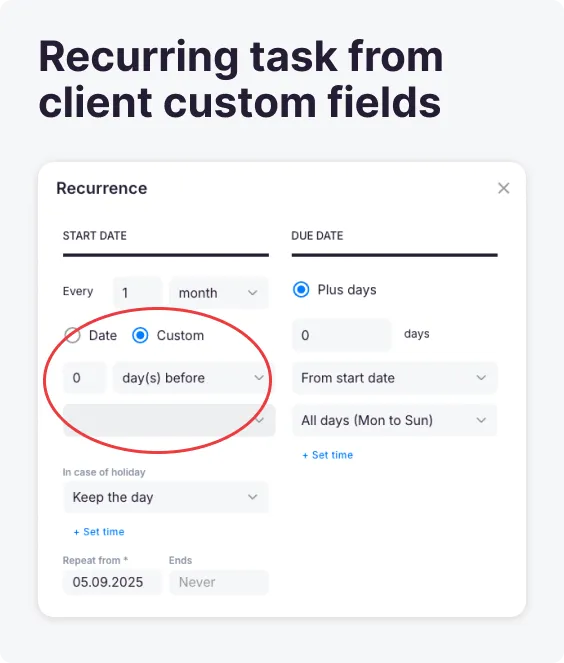
Why? The client card stays the single source of truth for dates, and recurring tasks stay aligned to each client’s real deadlines without manual adjustment.
2. eSigning & Approvals: collect digital signatures within your workflow
Section titled “2. eSigning & Approvals: collect digital signatures within your workflow”Uku’s eSigning is now live: collect digital signatures and approvals directly inside your practice management workflow, without switching between tools. This release includes:
- Dual signature support — request signatures from both clients and team members on a single document, for engagement letters, tax returns, and compliance documents that need multiple parties to sign.
- Streamlined document collection — request and collect eSignatures in one place, for smoother client interactions and faster document turnaround.
- Real-time tracking — monitor signature progress with activity timestamps and notifications; see at a glance which documents are pending, viewed, or signed.
- Client Portal integration — clients securely review, sign, and download documents through the Client Portal, and all signed documents are stored automatically for future reference.
- Automated reminders — Uku emails automatic reminders for unsigned documents, so workflows keep moving without manual follow-up.
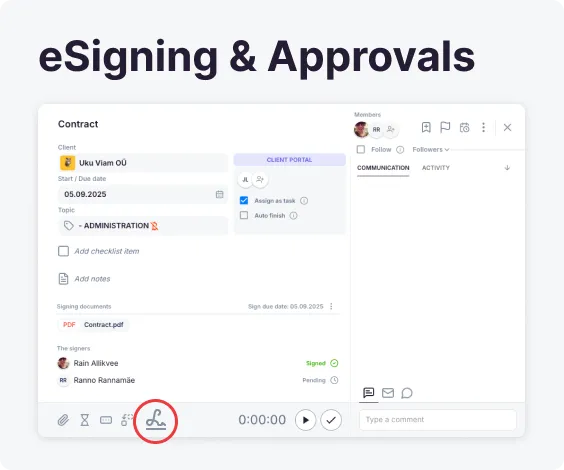
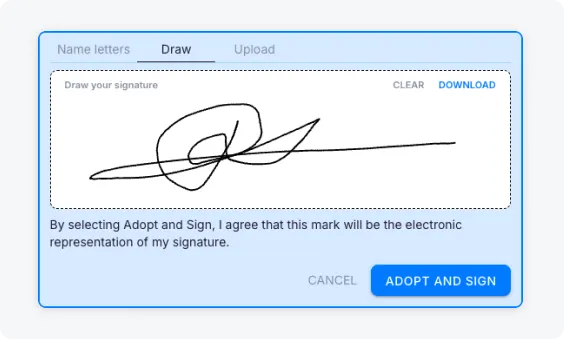
Why? Signatures and approvals stay inside your existing workflow, so client interactions are smoother and documents come back faster — no second tool to manage.
3. Public API: task management endpoints
Section titled “3. Public API: task management endpoints”Create and update tasks through Uku’s public API. Build custom integrations, automate task creation from external systems, or sync tasks with your other tools. Full documentation is in the API reference.
Improvements
Section titled “Improvements”Client Portal
Section titled “Client Portal”- Task conversations now display in a side-by-side layout: communication sits to the right of the task details, so clients follow the conversation while viewing task information — no more scrolling back and forth between details and messages.
File storage
Section titled “File storage”- The “Backup files to Uku file storage” feature now has better progress indicators and error handling.